

Better decisions start with listening.
Your own research community. Built around the people who matter.
Bring the people who matter to your research together in one place. With Survizo, you can build a research community under your own brand, ask the right questions and keep learning from the people who know your business best.
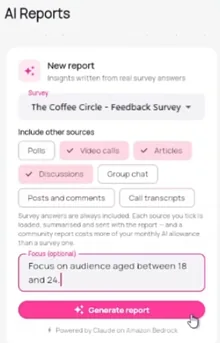
Reach your audience by email or through your own WhatsApp Business number, connecting with people who have opted in to hear from you. When a question comes up, start a conversation with a poll, survey, discussion, video response or live interview. Survizo brings their answers together in a slide deck and uses AI to draft a written report for you to review. Add your own logo and colours, and you could be asking your first question the very same day.
Prepare
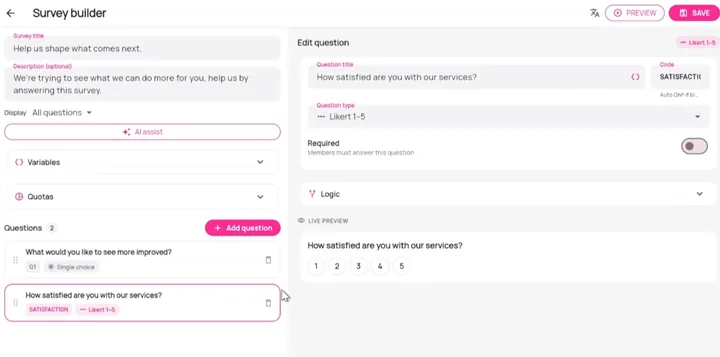
Start with a question. Let AI help with the draft.
Tell Survizo what you want to find out: for example, why people cancel after a month of your brand's subscription. AI drafts the questions for you, ready for you to review, refine and approve before they're shared with your community.
Review every question, refine the wording and make the draft your own.
Ask
Meet your audience where they are.
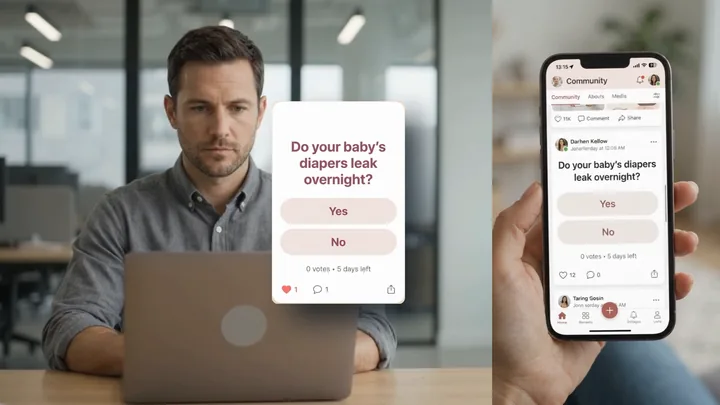
Run a quick poll and see responses come in. Start a discussion that keeps the conversation going over days. Or invite participants to a live video interview they can join straight from their browser, with nothing to install.
Participants can respond on their phones, in their own language, wherever they are.
Analyse
Go beyond the numbers. Understand what they mean.
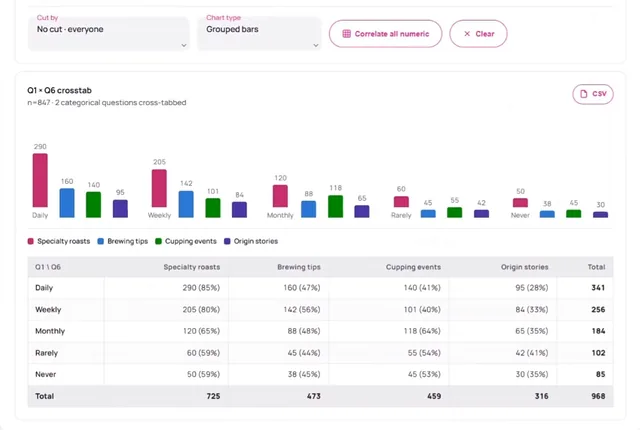
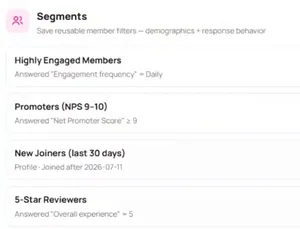
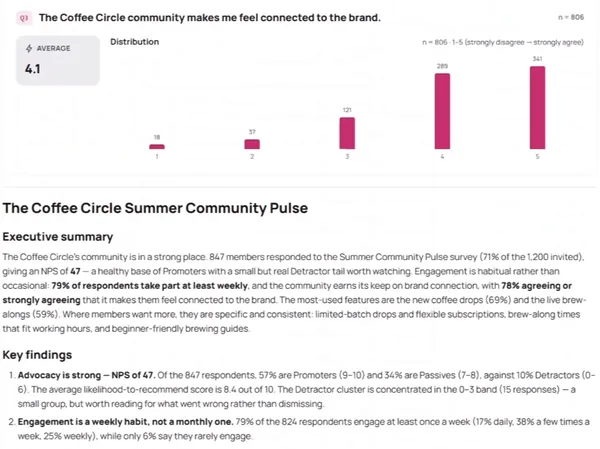
See what your audience thinks, where opinions differ and what deserves a closer look. Compare groups side by side, explore the responses behind each finding and see how many people answered. When a chart draws on fewer than ten responses, Survizo flags it so you can interpret the results with the right context.
Find the patterns worth exploring, with the evidence to put them in perspective.
Deliver
From finished research to presentation-ready results.
When your survey closes, your results are ready to take further. Export your data to Excel or SPSS and your findings to PowerPoint, all based on the same numbers. No more late nights checking figures across files before a presentation.
Survizo also uses AI to draft your written report, showing which sources informed each finding and which were left out, so you can trace the evidence, review the reasoning and present your findings with confidence. Spend less time preparing reports and more time putting your findings to work.
Spend less time preparing reports and more time putting your findings to work.
- .xlsx Excel workbook, with a key that explains every column
- .sav SPSS file for your analysts, every answer labelled
- .pptx PowerPoint deck, with charts you can still edit
- .docx Written report, in Word
- CRM Answers and scores on each customer's contact
How a study runs
One study, from the first question to the final presentation.
Follow a baby-care brand as it explores two questions: how often do nappies leak overnight, and what do parents do when it happens? The video walks you through the study from start to finish, and the steps below tell the same story in words.
-
Brief
The team defines what it wants to learn about overnight leaks. Survizo drafts the questions, and the team reviews and refines them before they're ready to share.
What members seeNothing yet. Behind the scenes, the team is setting up a community that feels like the brand, with its own name, logo, colours and web address. Members will see a familiar, branded experience when they're invited to join.
-
Recruit
Invite mothers from the brand's customer list by email or WhatsApp. Emails carry the brand's look and feel, while WhatsApp invitations come from its own Business number and go only to parents who've opted in. Keep control over who joins by approving new members, setting a membership limit or restricting access to specific company email addresses.
What members seeMothers receive an invitation that looks and feels like the brand, followed by a consent step before joining. Survizo records the exact wording each parent agrees to, giving the team a clear record of what they consented to.
-
Ask
Use a poll to get a quick read on what parents think, or a survey to explore the issue in more detail. Keep a discussion going over several days to understand the reasons behind their answers. Or invite a parent to an online video interview to hear them describe what a whole night looks like when a nappy leaks.
What members seeSimple activities they can complete on their phone, in their own language and in their own time. If an interview is recorded, participants first see the recording notice and give their consent.
-
Analyse
See how often nappies leak overnight, compare the experiences of new mothers and those who've been using the brand for longer, and uncover the themes that emerge in their stories. Survizo brings the numbers and written responses together, helping the team see what mothers are experiencing and where there's more to explore. Results based on too few responses are flagged, so the team knows when to look at the findings with care.
What members seeNothing new to do. Their responses become part of the bigger picture, helping the team understand mothers' experiences and learn from what they've shared.
-
Deliver
The team gets everything it needs to share and use the findings: an Excel workbook, an SPSS file, a PowerPoint deck and an AI-drafted written report, all based on the same results. Answers and scores can also flow directly into the brand's CRM, giving customer-facing teams useful research context where they already work.
What members seeThe community stays open, ready for the next question whenever the team wants to learn more.
What you get
Surveys that reach the right people and work the first time.
Survey mistakes caught before anyone answers
As you write, Survizo flags any skip that leads nowhere and any rule that names a missing question. Then preview the survey exactly as a member will see it.
The exact number of answers you need from each group
Say how many of each kind of person you need. Once a group is full, it stops taking answers, however fast they come in.
Twenty-one ways to ask
Rankings, heat maps on an image, sliders and video answers, so every question gets the format it needs.
Show the pack, the product or the prototype
Show people the pack, the product in 3D or a clickable prototype, right above the question.
On the call we match a plan to your project and show you everything it includes. You can also read how plans work.
Members' data
Built to keep your members' trust.
Each community stands alone.
Each community keeps its own members, settings, emails and look, so one brand's customers never mix with another's.
Recordings play for your team alone.
Only people on your team with access can play a call recording, and Survizo checks that access every time someone presses play.
Members can take their data.
Members can download what their community holds about them. They can also see what would be deleted, anonymised or kept, then ask for their account to be erased.
Connections you control.
When your other systems connect, each connection works for one community and does only what you allow. You can switch it off at any time or give it an end date.
Records you can get back.
If a record is deleted or changed by mistake, our team can restore your records to any second of the last thirty-five days.
Every member in their own language.
Members and your team can use Survizo in twelve languages, including ones that read right to left. The AI drafts each survey's translation, and someone on your team approves it.
Who it's for
Find the page for your team.
Research agencies
A community for each client, under the client's name.
Run every client's community from one login, and show each client only what you choose. Surveys, discussions, interviews and reports sit in one place, so nothing is copied between tools.
Survizo for agenciesBrands
Your customers, one message away.
Ask a quick question in a poll, start a discussion, or talk face to face on a live video call, all under your own brand. You can begin without writing a survey.
Survizo for brandsIndependent researchers
A client community you can run on your own.
Set it up yourself, under your client's brand. The results deck opens with their logo and name.
Survizo for independent researchersIn-house insight teams
One community across your markets, with results in your CRM.
Ask each market in its own language. Answers and scores go to the matching contact in your CRM, where your colleagues already look.
Survizo for insight teamsThe next step
Thirty minutes to know whether it fits.
Talk to the people who build Survizo. Bring a project you have coming up, and we'll show you how it would run.
What the call covers
- What you want to learn, and from whom.
- Survizo, shown on a project like yours.
- Next steps and, if it fits, a launch date.
Subscribe, or run one community for a single project. We quote on the call and show you what your plan covers.
Just have a question? Write to us on the contact page.