

Survizo / For independent researchers
For independent researchers
Run a client's customer community on your own, under the client's name.
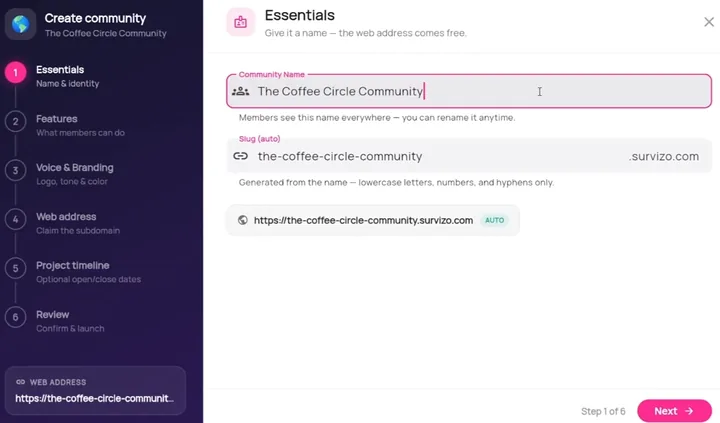
Survizo gives each client a private online community of their own customers, in the client's brand. If you work alone or with one or two others, you can take on a community project and run every part of it yourself.
Survizo's AI drafts the questions and the report, and you edit both into your own work. Your client gets the Excel, PowerPoint and Word files a large agency would send. You can pay for one project at a time.
Your client's community
Each client gets their own branded community, all from your one sign-in.
- Their brand
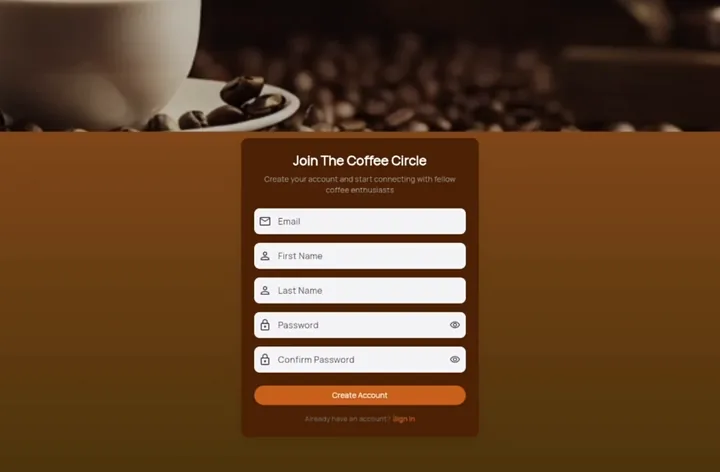
- Members see the client's own web address, logo and colours on every screen, and get invitations in the client's design. You work quietly behind their name.
- One login
- Every community you run, one per client, from a single sign-in. Move between clients from the menu, and each client's members and answers stay inside that client's community.
- Their view
- Give the client a sign-in to watch results come in. You choose which parts of the study they can see.
The problems
Deliver like a whole team, on your own.
You're running the whole project yourself.
A guided set-up takes you from name and brand to dates in six steps. Set start and end dates, and the community opens and closes to members on schedule while you keep full access. When a discussion gets busy, make a member you trust a moderator of that community.
The questionnaire takes time you'd rather spend thinking.
Describe what the client wants to learn and the AI drafts the questions for you to edit. Bring a questionnaire the client wrote in Word, and Survizo turns it into a draft you approve question by question. Members see nothing until you send it out.
The write-up starts late at night.
Ask the AI to sort what people wrote in their own words into themes, each with a short quote. Tick the parts of the study to include, and the AI drafts a summary, findings and recommended actions from them. Every saved report shows what it drew on and what it left out, so you can check it before your name goes on it.
The client expects the files a big agency would send.
Hand over an Excel workbook with a key to every question and answer, an editable PowerPoint deck and a Word report. An SPSS file comes with every question and answer labelled, so the client's analyst can open it and start.
Live interviews mean another tool and another bill.
Book interviews and small groups in the browser, inside the client's community. When you record a call, each person agrees before they join. Tap any line of the transcript and the recording plays from that moment. The AI can then pick out findings, each linked to the moment it came from.
A standing subscription doesn't fit a project budget.
Ask us to quote a single community for the weeks your project runs, and pay for that project alone. If you run studies all year, a subscription suits you better.
The work
A client project, start to finish.
Here is a typical solo project, step by step. Under each step is what the client's members see.
Set up
Name the community, add the client's logo and colours, choose its web address, and set the dates it opens and closes.
What members seeThe client's brand on every screen.
Invite
Upload the client's list with the details they already hold about each person. Then invite by email, or from the client's own WhatsApp Business number to people who have opted in.
What members seeAn invitation that looks like it came from the client. Before they say yes, they see what joining involves.
Ask
Have the AI draft the questions from the brief, or bring the client's questionnaire in Word, then edit until it reads the way you want.
What members seeA few short tasks on their phone, in the client's brand.
Listen
Run the interviews yourself in the browser, inside the client's community, and keep the recording and transcript with the study. Between sessions, a discussion keeps people talking.
What members seeAn invitation to a call, and a thread they can come back to. Nothing is recorded until each person agrees.
Write up
Pull themes from what people wrote and from any video answers you've turned into text. Compare groups on any question, and let the AI draft the report for you to rework.
What members seeNone of it. Private messages are left out of the analysis.
Hand over
Export the Excel workbook, the SPSS file, the PowerPoint deck and the Word report. The deck and the workbook carry the client's community name.
What members seeAfter the end date you set, a notice in place of the community.
The next step
Book a fit call.
Bring the project you're pitching for. On a thirty-minute call, we'll tell you whether Survizo fits it, how soon you could launch and what a single project would cost.