

Many communities, one account
Every client, brand and market. One login, and no client ever sees another's community.
Run a separate community of customers for each client, brand or market, and open every one of them with a single sign-in. Each community has its own web address, its own members, its own settings and its own look. For each one, you choose which clients and colleagues can look inside, and exactly which parts they can open.
Setting one up
Launch a new community in six guided steps.
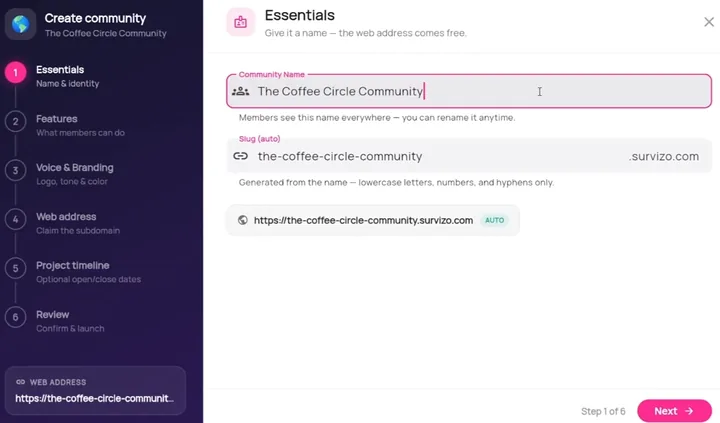
Press New Community on the Communities screen and a guided set-up opens. The six steps are listed down the left, and you can go back to any step you've finished.
Essentials
Type a name and Survizo suggests a web address to match as you go. Type your own address instead and Survizo keeps it exactly as you wrote it.
Features
Choose what members get, from content, surveys and discussions to the social feed, private messages and community chat. Decide here who can join, and change any of it later.
Voice and branding
Upload a logo, choose a colour, and write a tagline and a welcome message. A preview card shows them as members will see them.
Web address
Confirm the address from step one, where members will sign in. The screen tells you at once whether it's free, and it is secured for you. It stays the community's for good, so every link you send members keeps working.
Project timeline
Add start and end dates if you want them. Outside those dates, members who open the community see a short notice in its place. You keep full access throughout.
Review
One last look, then launch. We check once more that the address is still free before anything is saved.
In detail
You see every community. Everyone else sees only their own.
Its own address
Every community has its own address, such as the-coffee-circle-community.survizo.com. Members who type that address land on its own sign-in page, with sign-up one tap away. An invitation link, sent by email or from your own WhatsApp Business number to people who have opted in, opens straight onto sign-up.
- yourname.survizo.com
- Secure from day one
- Yours for good
One login, one switcher
One sign-in opens every community you run. A switcher at the top of the sidebar lists them, each with its logo, or its initials if it has none. Pick one and every screen, from content and surveys to members, data and branding, shows that community.
When you switch, the screen clears completely, so one client's work never shows in another client's community, even if the next one fails to load.
- One sign-in
- A logo beside each name
- Every screen switches with it
Walls between communities
Each community runs on its own settings. Who may join, its sign-in pages, its email wording, its features and its look are set for that community alone. Change one community and the others stay as they were.
Members, moderators and clients each sign in to one community, and see nothing from any other. A person who joins two of your communities gets a separate account in each, so what they share in one never shows up in the other. An AI report draws only on the answers from the community it was written for.
- Settings kept apart
- One account per community
- AI reads one community
Who else gets in
Let clients, moderators and colleagues in, and choose exactly what each one can see and do.
For each part of your workspace, you choose how much a person can do: No access, View only, View and remove, or Full access. Whatever you grant appears the next time the person signs in. Whatever you take away from a part stops working straight away.
Clients
Add a client by email to one community, and they get a client portal of their own. You can also let them into up to ten parts of your workspace, from the dashboard and surveys to the data and AI reports.
Most sections can be view only or full access. In the data, a client can break results down by age, gender, city and social grade, and never sees members' email addresses or national ID numbers. With AI reports at full access, they can generate a report and save it. Administrator settings, the links to your other systems, page design and the audit log always stay with your team.
Everything a client does is recorded under their own name in your audit log. Remove a client completely and all their access ends, usually within an hour, while anything you take away from a single part stops at once. You can reactivate them later.
- Ten sections to choose from
- Member emails stay hidden
- Recorded under their name
Moderators
Hand day-to-day care of a community to a member you trust by making them a moderator from its member list. They sign in with the email and password they already use there, and you grant sections one at a time. View and remove lets them take down other people's posts and comments. Full access lets them create, edit and publish there, for example run a survey or add people to the member list.
Their workspace names the community they look after, and keeps them inside it.
- Promoted from your members
- A level for each section
- Held to one community
Fellow administrators
Invite colleagues as administrators and choose, for each one, which parts of the workspace they open, which tools they use and how many communities they can create. A tool you leave out is hidden from them and stays switched off. You choose this for AI drafting, AI reports, AI call insights, Excel and PowerPoint exports, and segments.
No administrator can hand out more access than they hold, and only a full administrator can invite or manage other administrators. You can withdraw an administrator's access and restore it later from the same list.
- Sections, tools and a community count
- Hidden tools stay off
- Never more than you hold

A worked example
Three communities, and exactly what one client sees.
The names are made up. The sections and access levels are the real ones you can give a client.
Your account
- The Coffee Circle Community, at the-coffee-circle-community.survizo.com, run for a coffee brand.
- A parents' community for a second client, at its own address, with its own members and look.
- A small pilot community of your own.
You add the coffee brand's insight lead on Client access, for The Coffee Circle Community only.
What that client sees
| Section | Their access |
|---|---|
| Dashboard | View only |
| Activities & Surveys | Full access: write, change, open and close surveys |
| Data | View only, without members' email addresses or national ID numbers |
| AI Reports | Full access: read, generate and save reports |
| Members, Content, Polls | No access, because you left them out |
| The other two communities | Not reachable from this sign-in |
The client signs in on the same page as you, and sees these sections next to their client portal.
The record
See every time our staff looked in, and why.
Staff access, listed for each community
If our support staff ever open one of your communities, you see it in the Audit log, under Activity by Survizo. For the community selected in the switcher, it lists everything our staff looked at or changed there, who did it, when, and the reason they gave. Any time our staff were turned away is listed too.
If you set up the account yourself, our staff can look in only after you switch support access on. While it's on, your Account settings screen shows it. Switch it off and that access ends at once.
- Shown per community
- Refusals listed too
- Off until you switch it on
At a glance
Many communities, one account, in six facts.
One login
Every community you own, switched from the top of the sidebar.
A six-step set-up
Name, features, branding, address, dates and a final review.
Walls between them
Settings, accounts and AI reports stay inside one community.
Clients see what you grant
Section by section, with member emails kept out of their data.
Moderators and administrators
A level for each section, and nobody hands out more than they hold.
A record you can read
Every client action under their name, and every visit by Survizo staff.
Next up
Make it yours, and keep it safe.
Branding and white-label
Your customer community in your own brand, from the first email to the last screen.
Your customers see your logo, colours and words on every page and email of your community. Set it all on one screen, with a live preview.
Branding and white-labelSecurity and privacy
Know where your members' data lives, and who can reach it.
See where your members' data lives, who can reach it and how every support visit is logged. Hosted in the US, with 35 days of database backups.
Security and privacyThe next step
Book a fit call.
Thirty minutes with the people who build Survizo. Bring a study you have coming up. You'll leave knowing whether Survizo fits it and how soon you could launch.