

Members and consent
Invite your own customers, and keep proof they agreed.
Survizo gives you a private online community of your own customers to survey, poll and talk with, and you choose exactly who is in it. Upload your list, then invite people by email with your logo and colours, or from your own WhatsApp Business number to people who have opted in. Every member agrees to your terms before taking part, whether they sign up themselves or you added them. From their own profile page, members can download what you hold about them or ask for it to be erased.
How people join
From your customer list to active members in four steps.
The member list shows where each person stands, from added and invited to awaiting approval, active, suspended or removed.
Add them
Upload a CSV or Excel file of email addresses. Extra columns in your file, such as city or age, are saved to each person's profile. Your other systems can also connect and add people for you.
Invite them
Send invitations from the member list by email, from your own WhatsApp Business number to people who have opted in, or both. Each email carries your community's logo, colours and name, with a join button. Each WhatsApp message carries the community's name and its join link. Once the email is sent, the member list marks each person as Invited for you.
They join
The link opens your sign-up page. Before any account exists, the person reads what joining involves and says yes or no. They then confirm their email address with a one-time code we send to it.
They're in
The person becomes Active and sees the surveys, discussions and other areas you turned on. If you review new members, they wait as Awaiting approval, and the community opens to them once you approve.
In detail
Control who joins, what they see and what they hear from you.
Decide who gets in
Your joining rules decide who gets in. Turn on Invite-only and visitors without an invitation see a closed page instead of a sign-up form. Turn on Review new members and each sign-up waits on your Members screen until you approve it. Set a member limit and sign-ups stop there, including people awaiting approval. Name the email domains you accept, such as yourbrand.com, and only addresses there can join, uk.yourbrand.com included.
As standard, only people you invited or already listed can join, whether they use a password or Google. Invite-only simply tells everyone else so up front, before they fill in a form. Every rule is checked at each sign-up.
- Set when you create the community
- Change them any time
- Checked at every sign-up
What members get
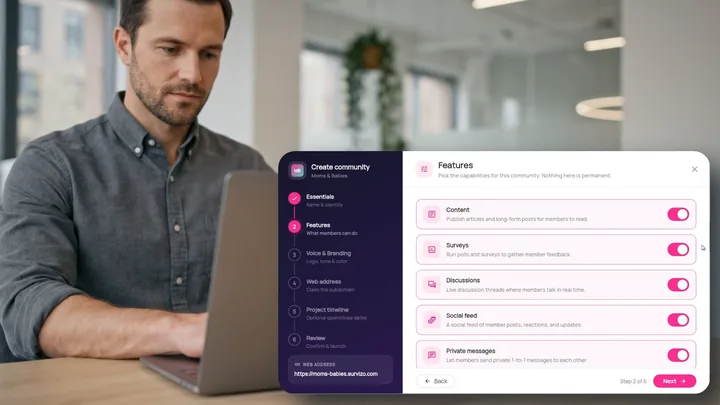
When you create a community, you choose which of six parts members get, from content, surveys and discussions to the social feed, private messages and community chat. You can change any of it later. Turn a part on or off and members see the change straight away, even if they already have the community open.
- Six parts to switch
- Change it any time
- Changes show instantly
Invitations and reminders
Invitation and reminder emails carry your logo, colours and name. Rewrite their subject, body, button and footer, and preview each one exactly as it will arrive. Every email keeps its unsubscribe link whatever you edit, so anyone who uses it gets no more invitation or reminder emails from that community. Invitations can also go from your own WhatsApp Business number to people who have opted in. Anyone who replies STOP hears nothing more on WhatsApp from that community.
Reminder emails go only to people on your list who are still to sign up. You choose how long after the invitation the first reminder goes, how many days between reminders, and the most anyone receives. Survizo sends due reminders once a day, or you can send them straight away. When your other systems send invitations, Survizo limits how many each person gets, so one faulty setting never floods an inbox.
- Your logo, colours and name
- Reminders start when you switch them on
- An unsubscribe link in every email
Sign-up and sign-in pages that look like yours
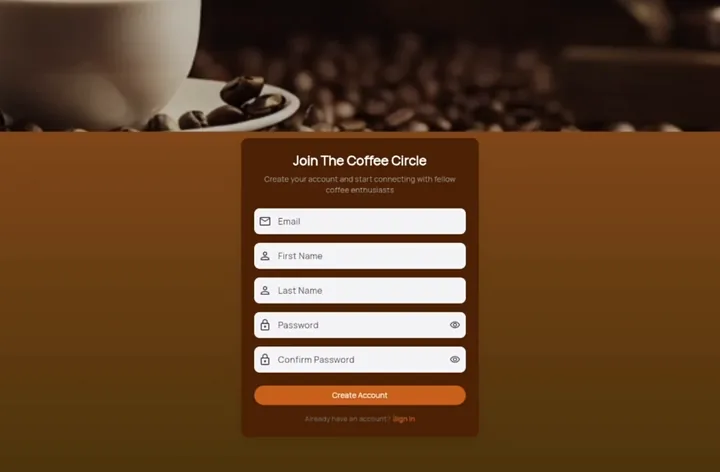
You design your community's own sign-in and sign-up pages in Survizo, with no code needed. Members who visit your community's own web address land on sign-in, with sign-up one tap away. An invitation link opens straight onto sign-up.
Members sign in with their email address and a password. Switch on Google sign-in and members can use their Google account instead. Each community keeps its own accounts, so a person in two of your communities signs in to each one separately.
- Pages you design yourself
- A one-time code for new accounts
- Google where you switch it on
Consent you can prove later
The join notice says what the community stores, and that posts, messages and survey answers are collected for its research. It links to your community's own terms and privacy pages, and tells members plainly that your team can see who said what. Anyone who declines simply does not join.
When someone agrees, we record which notice they saw and the time by our own clock, so a wrong date on their device never changes it. We also save a digital fingerprint of the exact wording of your terms and privacy pages at that moment. If you edit them later, the record still proves which version each member agreed to. People you added yourself see the same notice at their first sign-in.
- Timed by our servers' clock
- A fingerprint of the exact text
- Visible to you
Member profiles that fill in as people answer
Set a survey question to save its answer to the member's profile, so you do not have to ask again. Members can also add a profile picture that shows beside everything they post. There are nineteen built-in details, from age and city to household size, and you can add up to thirty of your own per community. Columns from your upload become details too.
Group members by those details, by their answers or by how active they are. If you share results with someone outside your team, such as a client, they can break them down by age, gender, city and social grade. They never see a member's email address or national ID number.
- Nineteen built-in details
- Up to thirty of your own
- Emails kept from shared results
What members control
Members download or erase their own data, and you approve every erasure.
Members find both options on their own profile page, and each covers only the community they are in. Download my data gives them a file of everything that community holds about them. The screen and the file both tell the member whether their copy is complete. Each file is made fresh on request and never stored, so no spare copy is left behind.
They ask
The member presses Delete my data and can add a reason. Before they confirm, they see the full plan of what will be deleted, anonymised or kept.
The request waits for you
The request comes to you, as the community's administrator. The member can withdraw it at any time until the deletion starts.
You decide
On your audit screen, you mark the request as seen, decline it with a reason, or carry it out. The confirmation shows the same list the member saw.
The plan runs
Once you carry it out, the erasure is final, and it shows as finished only when every step is done. A run that stops part way is marked partial until it completes.
A worked example
See exactly what an erasure request deletes, anonymises and keeps.
This is the plan a member reads before confirming, in the order it's carried out. What the member reads is exactly what happens, because both come from the same list.
What the member asks
Delete my data.
- Asked from the Your data card on their profile page.
- Covers this community only. Someone in two communities asks each one.
- The full plan is on screen before the confirm button.
What happens
| Outcome | Data | Kinds |
|---|---|---|
| Deleted | Profile and picture, notifications, reactions, what they had read, direct messages they sent, their sign-in account | 6 |
| Anonymised | Survey answers, posts and comments, chat and discussion messages, poll votes, messages others sent them, complaints they filed, the calls they joined | 7 |
| Kept | Call recordings and transcripts, the consent record without their identity, the audit trail for up to 365 days, email records for up to 180 days | 4 |
| Not reachable | Records of the devices they signed in on, which nobody can trace back to them once their account is gone | 1 |
Anonymised means we swap the person's identity for a code and keep no key that links the code back to them. A video answer's recording is deleted, and its transcript and length stay with the anonymised answer. Call recordings are kept, because other people are on them.
At a glance
Members and consent in six facts.
Your own list
Upload a CSV or Excel file, or add people from your own systems.
Joining rules you set
Keep it invite-only, approve sign-ups, cap its size or accept only your domains.
Branded invitations
By email in your colours, or from your own WhatsApp Business number to people who have opted in, with email reminders on your schedule.
Consent on record
A timed record of the exact wording each member agreed to.
Their data, their copy
Members download what you hold, or ask for it to be erased.
Twelve languages
Each member picks theirs in their browser, including languages written right to left.
Next up
Where to go from here.
Security and privacy
Know where your members' data lives, and who can reach it.
See where your members' data lives, who can reach it and how every support visit is logged. Hosted in the US, with 35 days of database backups.
Security and privacyBranding and white-label
Your customer community in your own brand, from the first email to the last screen.
Your customers see your logo, colours and words on every page and email of your community. Set it all on one screen, with a live preview.
Branding and white-labelThe next step
Book a fit call.
Thirty minutes with the people who build Survizo. Bring a study you have coming up. You'll leave knowing whether Survizo fits it and how soon you could launch.