

Community and conversation
Keep your community talking between surveys, and learn from what they say.
Your community is the people who chose to join, such as your customers, and Survizo keeps them talking to you between surveys. They post in a feed, vote in polls, talk in private rooms and write to you. You choose which of these each community gets, and your reports can draw on what members say.
What members get
Choose the tools each community gets.
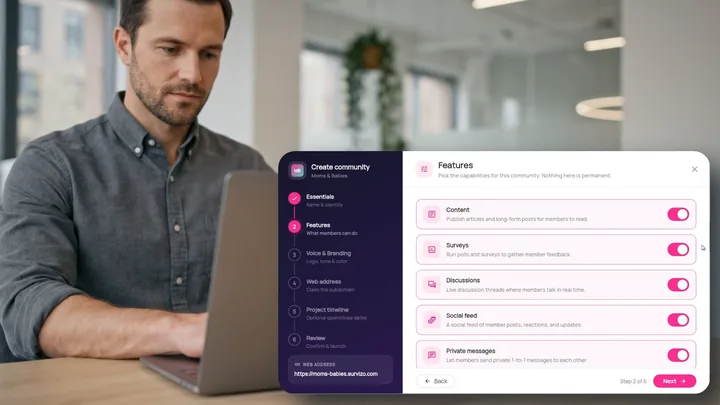
Switch on only what you need
Every new community comes with six tools for members: content, surveys, discussions, a social feed, private messages and a community chat. All six start on. Switch off any your members won't need, and switch them back on whenever you like from your admin settings.
- Six switches
- All on to start
- Change them any time
A feed where members share, and you join in
Members post photos and videos, comment, mention each other and react. You see every post, comment and reaction, and you can reply to it or take it down.
You join the conversation under your own name, right alongside members. Post, comment, react, vote and message members, with moderation tools on every post. The feed updates as members post, so you see new activity without refreshing the page.
- Photos and video
- Mentions and reactions
- Live, with no refreshing
A worked example
Ask in the feed, and get the answers in a spreadsheet.
One question for a parents' community, answered on members' phones. Download any survey's results to Excel, and the file includes an extra sheet with every poll in that community.
What members see
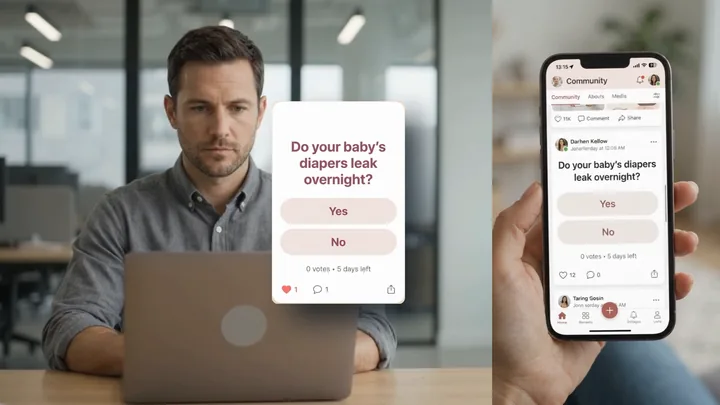
The poll as a card and in the member feed, with the time left to vote under the answers.
The Polls sheet
| Option | Type | Voters | Votes | Percent |
|---|---|---|---|---|
| Yes | single-select | 148 | 97 | 66% |
| No | single-select | 148 | 51 | 34% |
- Each row repeats the poll's question, so you can filter and sort this sheet like the rest of the file.
- Every answer gets a row, including one nobody chose.
- Percentages are out of everyone who voted. When members can pick several answers, each shows how many voters chose it, so the total can pass 100.
The numbers are made up. The columns are exactly what the Excel file uses.
Polls in detail
Get a quick answer, and watch it arrive.
How a poll runs
Start a poll from the Polls page in Survizo. Give it a question, two to ten answers, one choice or several, and a closing time if you want one. Members are notified when it opens, and the votes start arriving.
Each member votes once, picking one answer or several as you set, and can change or take back their vote while the poll is open. The bars move for everyone as each vote lands, and members see them before and after they vote. Once a poll goes live its answers are locked, so nobody can change what a vote meant after it was cast.
- One vote each
- Live results
- Optional closing time
When a poll ends
A poll stops taking votes at its closing time or when you close it. It then leaves the members' feed and stays in Survizo with its results. Moderators you give poll access to can start, close and delete polls too.
Deleting a poll hides it from members and keeps its votes, marked as deleted in your results, so you can restore it within 30 days. To end a poll and keep it on record for good, close it rather than delete it. When you close a poll yourself, Survizo sends the final count for each answer to any system you've connected.
- Results kept in Survizo
- Restore within 30 days
- Final votes sent when you close it
Discussions and messages
Talk with members in private, in the open, or one to one.
Private discussion rooms
A discussion room is private. You create it and choose between one and fifty people from your member list, and only they and you can read it. Add or remove people at any time, and anyone you add joins the conversation from that moment.
Members write with photos, videos and emoji reactions. Every message shows who really wrote it, and nobody can post under someone else's name. A reply quotes the message it answers, and tapping the quote jumps back to it. Replies stay in one easy-to-follow line of conversation. When a side topic takes off, you can move it into a room of its own, starting from the message that sparked it.
Your team can remove a message for everyone, with an optional reason. Only the community owner can delete a room, and that takes every message in it. Before they confirm, Survizo shows how many side rooms go too.
- Invite only
- Quoted replies
- Split a side thread
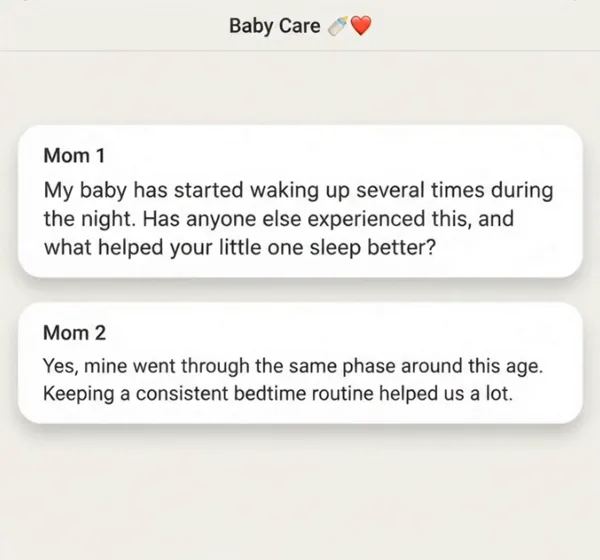
Community chat and Messages
Community chat is one room for the whole community, at the top of Discussions. Only members of that community can read or post in it, and Survizo checks every time.
Messages is for one-to-one conversations. Members can write to any active member of their community, or to you, and you can message any member straight from your member list. Alerts come in the app and by email, in your community's colours, logo and name. In a busy conversation, Survizo sends at most one email every fifteen minutes, so nobody's inbox fills up. Each member chooses to hear about messages in the app, by email, both or neither.
- One community room
- One-to-one messages
- Branded email alert
Content
Share posts, videos and courses that members pick up where they left off.
Publish posts, videos and courses
Build a post from blocks, such as headings, paragraphs, captioned pictures, videos, quotes and dividers. You can also publish a video by itself. A course puts posts and videos in order, so members can work through a topic step by step. Members can comment under any post or video.
Each member keeps their own progress, so the Content page opens with a Continue row for what they started, beside filters and search. That progress is private to each member, so they can learn at their own pace without feeling watched.
Before anything goes live, Survizo checks it is accessible, so members who use screen readers or watch without sound can follow it. Every picture needs a description unless you mark it as decoration, and every video needs captions unless it has no speech. The check points to the block that needs attention. Schedule an item and members see it from the time you set.
- Posts, videos, courses
- Members resume where they stopped
- Captions before publishing
Moderation
Let members you trust help moderate, and choose exactly what each one can touch.
Members can send a complaint from inside the community, and you can pass it to a moderator to read and answer.
Promote a member
From the member list, make someone a moderator of this one community. They sign in as they always do, and see only that community.
Choose what they can see and do
Choose the sections they can open, and a level for each: View only, View and remove, or Full access. Each section offers only the levels that make sense for it.
They review posts as they come in
Their inbox is a live list of feed posts and comments, which they can filter to all, visible or removed. Removing a post takes its comments and reactions with it, and the author sees the reason.
Take it back at once
Take a permission away and it applies from their very next click, with no need to sign them out.
In your analysis
Turn what members say into findings.
Reports, Excel downloads and what stays private
Your reports can use what members say in discussions, chat, the feed, your content and polls, alongside their survey answers. When you ask Survizo's AI assistant to write a report, you choose which of these it reads.
The Excel workbook you export from a survey includes a Polls sheet and a Discussions sheet. The Discussions sheet shows how many messages and people each room had, while the conversations themselves stay inside Survizo. For very large communities, the sheet notes how many rooms it does not list, so you know what is included.
Private messages and complaints stay private, and never reach the analysis.
- You choose the sources
- Counts in Excel, words stay in Survizo
- Private messages stay out
At a glance
Community and conversation in six facts.
Four ways to talk
Feed, private rooms, community chat and one-to-one messages, and you choose which each community gets.
Polls with live results
Two to ten answers, one vote each, and an optional closing time.
Rooms stay private
Only you and the people you invite can read them, and every name shown is the real author's.
Accessible before it publishes
Picture descriptions and video captions get checked first.
Moderators by section
View only, view and remove, or full access, in one community.
Into your analysis
Polls and room counts go into your Excel download. Private messages never do.
Next up
Where to go from here.
Live interviews and groups
Talk to your customers on video, then replay the moment that mattered.
Talk to your customers on video, one to one or in groups, with nothing to install. Get a transcript and AI findings that play the moment they came from.
Live interviews and groupsMembers and consent
Invite your own customers, and keep proof they agreed.
Invite your customers by email and WhatsApp, choose who joins, and keep a timed record of the exact wording each member agreed to.
Members and consentThe next step
Book a fit call.
Thirty minutes with the people who build Survizo. Bring a study you have coming up. You'll leave knowing whether Survizo fits it and how soon you could launch.